If You answer Y, the zimbra mailbox will be restarted
[](https://docs.intalioservices.com/uploads/images/gallery/2021-08/G02pnrlrOoDus8Yy-image-1630421205274.png) After the mailbox restart, zimlet should be installed. To check it, login into the Panel Admin in Your ZCS Server and see Panel Administrator > Migration and tool > ZI-License. There should be information about granted licenses.In case of the **multi server** instalation, zimlet must be installed on **each mailbox.**
Remeber to restart all mailboxes (as zimbra): `zmmailboxdctl restart`
# Configuration ### Zimlet configuration Main configuration is done through the config file available under `/opt/zimbra/lib/ext/IntalioZiMailApproval/approvalMap.json` **ResponsibleGroups** - Groups of accounts accepting or declining e-mails. **IrresponsibleGroups** - Groups of accounts whose e-mails have to be accepted or declined. **Map** - Defines who can accept whose e-mails. In the following example `jan@zimbrademo.intalio.pl` can review `robert@zimbrademo.intalio.pl` mails when he doen't have an influence on `test@zimbrademo.intalio.pl` account's mails. [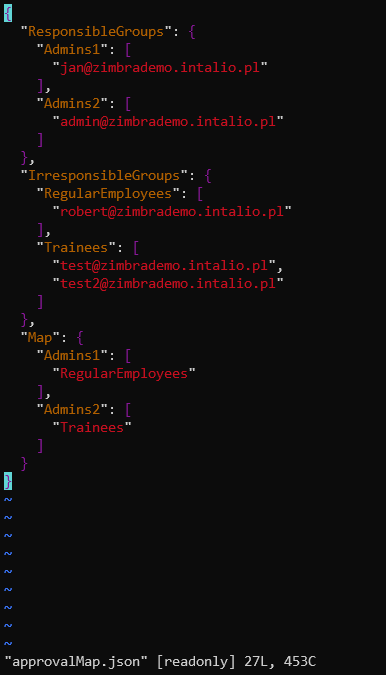](https://docs.intalioservices.com/uploads/images/gallery/2021-09/uYshQaYruSaIDpEd-image-1630498391841.png)Mail reviewers have to have also zimlet availibilty set on in the Zimbra Administration Console. [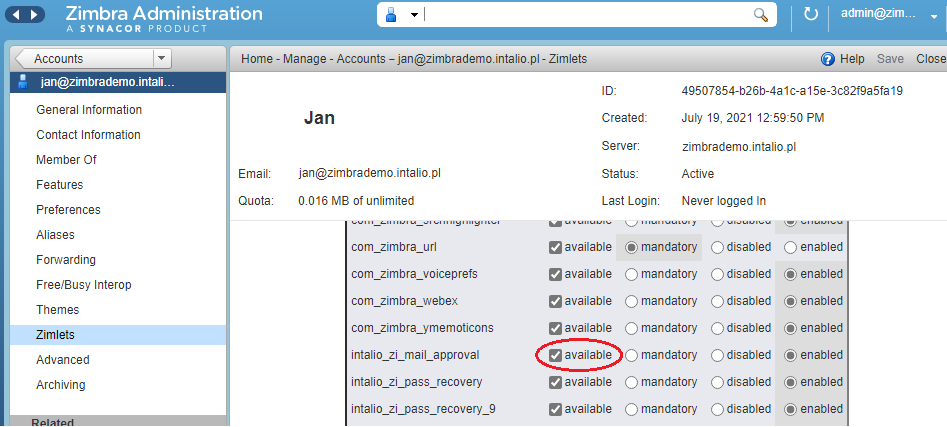](https://docs.intalioservices.com/uploads/images/gallery/2021-09/wXAr5TcUyyP3cOhz-image-1630574417247.png)
### CBPolicyd configuration ZI-MailApproval requires installed, enabled and configured CBPolicyd service. ##### Pre-requisites Enable the Access Control attribute in Zimbra and restart services. ``` su - zimbra zmprov ms `zmhostname` zimbraCBPolicydAccessControlEnabled TRUE zmmtactl restart zmcbpolicydctl start ``` ##### Group 1. In PolicyD Web interface, Go to **Policies -> Groups**. 2. Click on **Action** dropdown -> Add**.** 3. Specify Name for example *GrupaZiIntalioMailApproval*. Click **Submit**. *GrupaZiIntalioMailApproval* group should be created successfully. [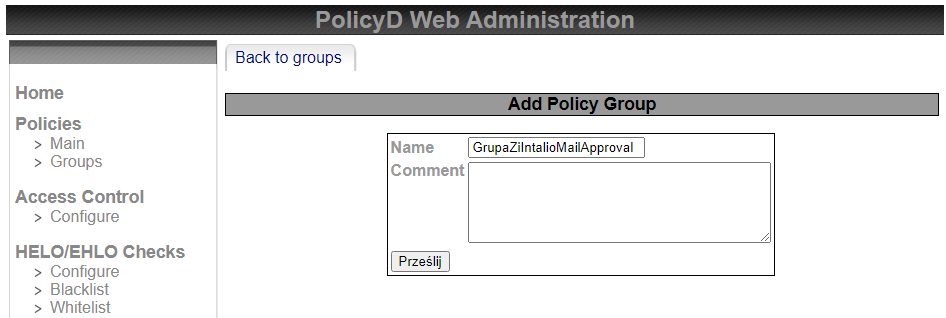](https://docs.intalioservices.com/uploads/images/gallery/2021-09/JSBHjKsDxheC0zqQ-image-1630507564653.png) 4. Go to **Policies -> Groups** and select *GrupaZiIntalioMailApproval* and from Action dropdown select **Members**. [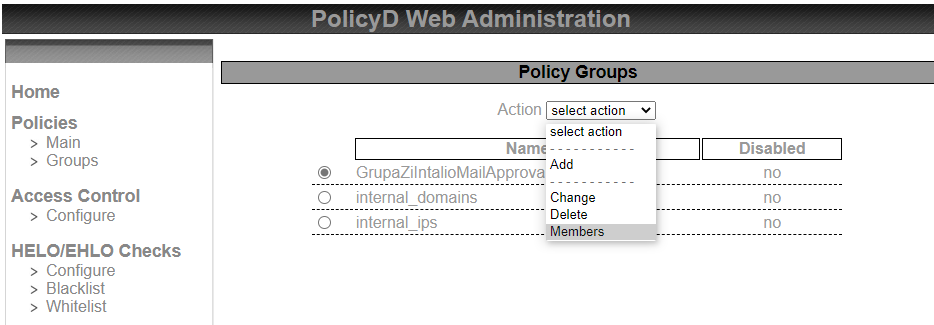](https://docs.intalioservices.com/uploads/images/gallery/2021-09/EzTWeqmuFSrLBD2t-image-1630507707298.png) 5. On the page, from Action dropdown select **Add** 6. In *Member* textbox, specify one of the users you want to assign to ZI-MailApproval functionality. Here *test@zimbrademo.intalio.pl* was used as an example. Then click **Submit**. [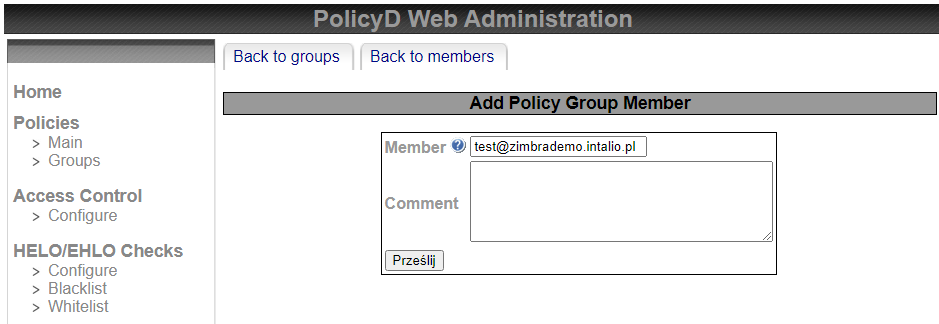](https://docs.intalioservices.com/uploads/images/gallery/2021-09/HWl8IMaM7FVekSha-image-1630507757030.png) 7. At the top of the page, click on **Back to members**. Select the above created member *test@zimbrademo.intalio.pl*. From Action dropdown select **Change**. 8. For **Disabled**, select **No** from the dropdown. Click **Submit**. [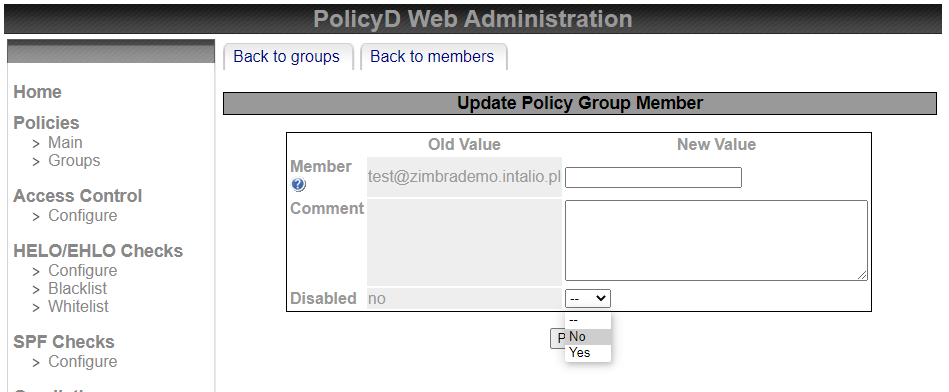](https://docs.intalioservices.com/uploads/images/gallery/2021-09/LLvH7CDbMyE3Bgyh-image-1630508390898.png) 9. Go to **Policies -> Groups** and select *GrupaZiIntalioMailApproval*. From Action dropdown select **Change**. 10. For **Disabled**, select **No** from the dropdown. Click **Submit [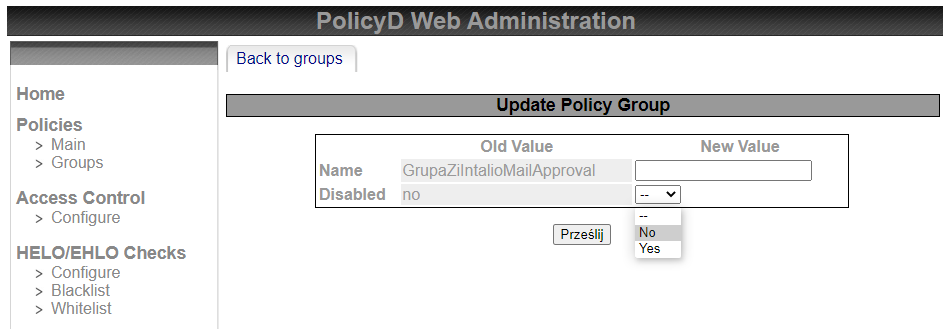](https://docs.intalioservices.com/uploads/images/gallery/2021-09/WNQQMOaYKHanZP6u-image-1630507626179.png)** 11. The *GrupaZiIntalioMailApproval* group is now enabled. ##### Policy 1. Go to **Policies -> Main**. 2. Click on **Action** dropdown -> Add**.** 3. Specify Name for example *ZiIntalioMailApproval*, Priority *10* and Description *ZiIntalioMailApproval*. Click **Submit**. The policy should be created successfully. [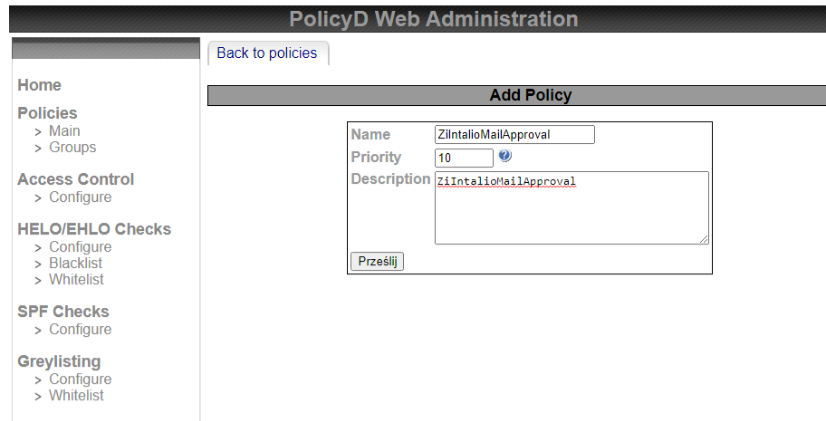](https://docs.intalioservices.com/uploads/images/gallery/2021-09/ujTuyrbM3PKqWBYm-image-1630569738488.png) 4. Go to **Policies -> Main** and select *ZiIntalioMailApproval*. From Action dropdown select **Members**. 5. On the page, from Action dropdown select **Add**. 6. In **Source** textbox, specify *%GrupaZiIntalioMailApproval* and in **Destination** textbox, specify *any*. Click **Submit**. [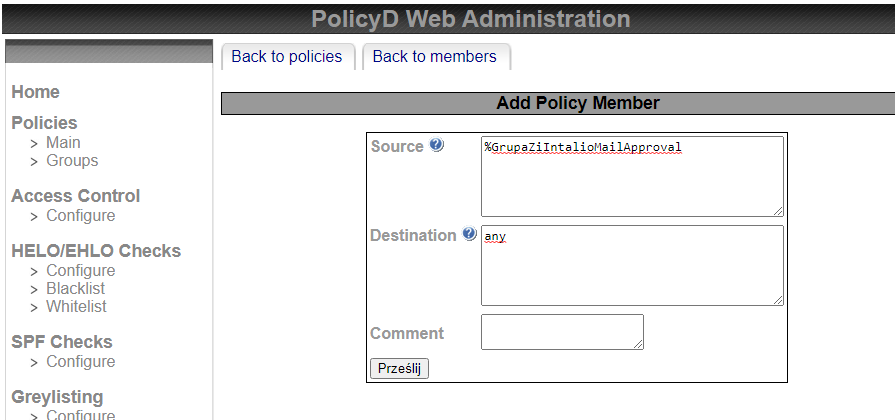](https://docs.intalioservices.com/uploads/images/gallery/2021-09/hqFFR0TazU68SinS-image-1630569936938.png) 7. At the top of the page, click on **Back to members**. Select the above created member. From Action dropdown select **Change**. 8. For **Disabled**, select **No** from the dropdown. Click **Submit**. 9. Go to **Policies -> Main** and select *ZiIntalioMailApproval*. From Action dropdown select **Change**. 10. For **Disabled**, select **No** from the dropdown. Click **Submit**. 11. The *ZiIntalioMailApproval* policy is now enabled. ##### Access Control 1. Go to **Access Control -> Configure**. 2. Click on **Action** dropdown -> Add**.** 3. In **Name** textbox, specify *ControlZiIntalioMailApproval*. 4. In **Link to policy** dropdown, select policy *ZiIntalioMailApproval* 5. In **Verdict** dropdown, select *Hold*. [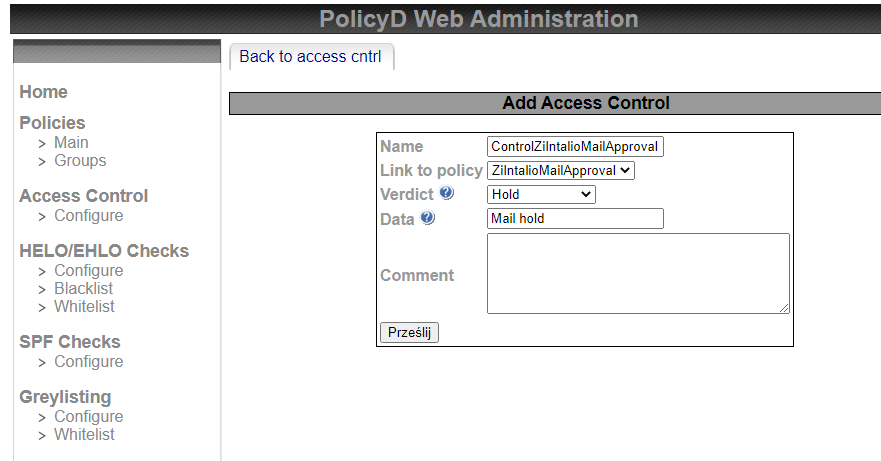](https://docs.intalioservices.com/uploads/images/gallery/2021-09/0ACYy3OrjcMThswQ-image-1630571582410.png) 6. Click **Submit**. The Access Control list should be created successfully. 7. Go to **Access Control -> Configure** and select *ZiIntalioMailApproval* 8. From Action dropdown select **Change**. 9. For **Disabled**, select **No** from the dropdown. Click **Submit** # Release Notes # ZI-MailApproval 1.0 ##### \[29.09.2023\] Wersja 1.8 #### Nowości - Dodano możliwość zmiany hasła lokalnego. Jeżeli autoryzacja ma włączony fallback - po nieudanej zmianie hasła w AD, system zmieni hasło lokalne (funkcja działa zarówno z panelu użytkownika, `zmprov setPassword` oraz panelu admina). --- ##### \[22.08.2023\] Wersja 1.7 #### Nowości - Przygotowanie modułu pod Z10. --- ##### \[16.08.2022\] Wersja 1.7 #### Nowości - Przygotowanie modułu pod JRE 17. --- ##### \[09.03.2021\] Wersja 1.6 #### Nowości - Wydanie wersji dla Zimbry 9 - kompatybilnej z Zimbrą 8 --- ##### \[03.06.2020\] Wersja 1.5 #### Nowości - Dodanie nowego CI. --- ##### \[02.04.2020\] Wersja 1.5 #### Nowości - Dodanie weryfikacji portu SSL podczas sprawdzania licencji. --- ##### \[31.03.2020\] Wersja 1.5 #### Nowości - Dodanie obsługi nowej wersji serwera licencji (>=1.0.6), zmiana sposobu odpytywania o licencje (mniejsze zużycie zasobów). --- ##### \[03.03.2020\] Wersja 1.4 #### Nowości - Dodanie katalogu głównego do instalatorów. --- ##### \[03.03.2020\] Wersja 1.4 #### Nowości - Dodanie obfuskacji kodu. --- ##### \[07.01.2020\] Wersja 1.3 #### Nowości - Aktualizacja flagi wymagania zmiany hasła po poprawnym zalogowaniu(jeżeli użytkownik spróbował zalogować się do systemu, ale AD zwróciło potrzebę zmiany hasła to flaga wymaganej zmiany hasła pozostawała niezmieniona) --- ##### \[02.01.2020\] Wersja 1.3 #### Nowości - Dostosowanie kodu do java13 + Zimbry 8.8.15, porzucenie wsparcia dla Javy starszej niż 13 --- ##### \[24.04.2019\] Wersja 1.2 #### Nowości - Dodanie zamykania sesji po autoryzacji (W przypadku samby) --- ##### \[15.04.2019\] Wersja 1.1 #### Nowości - LicenseSystem - dodanie kompatybilnej weryfikacji licencji dla Zimbry > 8.8.11 --- ##### \[15.04.2019\] Wersja 1.1 #### Nowości - Ustawienie poprawnego scope.