**Dynamic forms can be connected to any other system, but we provide full support for OTRS.**
### The order of the fields in the article You can see the sorting functions in "[Sorting of fields in the OTRS article](https://docs.intalioservices.com/books/dynamic-forms---installation-and-administrators-guide/page/sorting-of-fields-in-the-otrs-article "Sorting of fields in the OTRS article")" ### Display field as article content or dynamic field In each field there is a parameter "**otrs\_visible**" available, with it you can define where the content of the field is to be displayed - article, dynamic field etc.This field is mandatory and if you do not complete it, it will be set to "article" by default.
### Assignment of ticket title from the form The identifier of each field can be set to any text. But if you want to add, for example, an otrs title, you have to adapt to the appropriate structure. **SYSTEM\_Ticket\_\[OTRS field id\]****All fields for ticket description are available, e.g. title, queue, owner etc.**
If you want the owner of the ticket to become "john.kowalski" just add such an ID: "**OTRS\_Ticket\_Owner**".[Migrating from IntalioDynamicForms 1.0.x to IntalioDynamicForms 1.2.x](https://docs.intalioservices.com/books/dynamic-forms---installation-and-administrators-guide/page/migrating-from-intaliodynamicforms-10x-to-intaliodynamicforms-12x "Migrating from IntalioDynamicForms 1.0.x to IntalioDynamicForms 1.2.x")
### Assigning a queue from the form If you want to assign a queue to a ticket, simply set the ID to "OTRS\_Ticket\_Queue".[Migrating from IntalioDynamicForms 1.0.x to IntalioDynamicForms 1.2.x](https://docs.intalioservices.com/books/dynamic-forms---installation-and-administrators-guide/page/migrating-from-intaliodynamicforms-10x-to-intaliodynamicforms-12x "Migrating from IntalioDynamicForms 1.0.x to IntalioDynamicForms 1.2.x")
### Adding dynamic fields Dynamic fields are subject to a different rule, in their case we do not use a defined structure. The field identifier must be identical to the dynamic field identifier in OTRS.[Migrating from IntalioDynamicForms 1.0.x to IntalioDynamicForms 1.2.x](https://docs.intalioservices.com/books/dynamic-forms---installation-and-administrators-guide/page/migrating-from-intaliodynamicforms-10x-to-intaliodynamicforms-12x "Migrating from IntalioDynamicForms 1.0.x to IntalioDynamicForms 1.2.x")
### Assigning other OTRS fields All fields describing the ticket are available in dynamic forms. Just adjust to the structure **OTRS\_Ticket\_\[OTRS field id\]**.[Migrating from IntalioDynamicForms 1.0.x to IntalioDynamicForms 1.2.x](https://docs.intalioservices.com/books/dynamic-forms---installation-and-administrators-guide/page/migrating-from-intaliodynamicforms-10x-to-intaliodynamicforms-12x "Migrating from IntalioDynamicForms 1.0.x to IntalioDynamicForms 1.2.x")
# Administration settings In the system configuration you will find plenty of fields that will allow you to customise your Dynamic Forms system. To see all configuration options: 1. Click on the *Admin* tab and pick *System configuration* 2. Find **Intalio Dynamic Forms** in the *Navigation bar* 3. From the dropdown menu choose Core [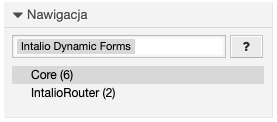](https://docs.intalioservices.com/uploads/images/gallery/2020-10/VUHGn0m5BjR4WjQu-image-1603104520977.png) ##### Intalio::DynamicForms::DefaultLock Possible values: - lock - unlock Specify if the ticket should be locked or unlocked when the ticket is created.Default value: **unlock**
--- ##### Intalio::DynamicForms::DefaultOwner Specifies the default owner of the ticket who will be assigned to the ticket after its creation by the form system (agent login). You should make sure that the agent with the login provided in this configuration exists.Providing the login of a non-existent agent will make it impossible to send the form.
Default value: **[root@localhost](mailto:root@localhost)**
--- ##### Intalio::DynamicForms::DefaultPriority Specifies the default priority of the created ticket.Default value: **[root@localhost](mailto:root@localhost)**
--- ##### Intalio::DynamicForms::DefaultQueue Specifies the default queue of the created ticket. You should make sure that the queue with the name you provided in this configuration exists in your system.Providing the name of a non-existent queue will make it impossible to send the form.
Default value: **[Raw](mailto:root@localhost)**
--- ##### Intalio::DynamicForms::DefaultState Specifies the default state of the created ticket. You should make sure that the state with the name you provided in this configuration exists in your system.Providing the name of a non-existent state will make it impossible to send the form.
Default value: **[new](mailto:root@localhost)**
--- ##### Intalio::DynamicForms::DefaultQueue Specifies the default queue of the created ticket. You should make sure that the queue with the name you provided in this configuration exists in your system.Providing the name of a non-existent queue will make it impossible to send the form.
Default value: **[root@localhost](mailto:root@localhost)**
--- ##### Intalio::DynamicForms::DefaultType Specifies the default type of the created ticket. You should make sure that the type with the name you provided in this configuration exists in your system.Providing the name of a non-existent type will make it impossible to send the form.
Default value: **[Unclassified](mailto:root@localhost)**
# Sorting of fields in the OTRS article #### Custom sort: You can use the "order\_by" and "order" params. You can find more information here: [Form configuration - file structure and general configuration](https://docs.intalioservices.com/books/dynamic-forms---installation-and-administrators-guide/page/form-configuration---file-structure-and-general-configuration "Form configuration - file structure and general configuration") If the field does not have the required parameter (e.g. "order"), it will be added at the end. #### By default: Fields are sorted by identifiers, if you want the fields to be in a certain order, you must name them accordingly. ***Example:*** ```JSON { "size": "s12 m6 offset-m3", "type": "number", "id": "2_FieldID", "label": "Number", "validate": [ "" ], "icon": "filter_1", "otrs_visible": "all", "hidden": false, "value": "" }, { "size": "s12 m6 offset-m3", "type": "textarea", "id": "1_FieldID", "label": "Textarea", "validate": [ "" ], "icon": "announcement", "otrs_visible": "all", "hidden": false, "value": "" } ```This configuration will cause the field "1\_FieldID" to be displayed above "2\_FieldID" in the OTRS article request.
# File permissions **Script: `/opt/otobo/bin/otobo.SetPermissions.pl` Directories User:** otobo **Group:** www-data **Minimum permissions:** 666 **Files User:** www-data Group:** www-data **Minimum permissions:** 660