# Administration
#### Overview
DynamicFieldsVisibility is simple tool without additional Admin page. Visibility management is performed entirely within OTRS System Configuration (SysConfig).
#### Prerequisites
Module Dynamic Fields Visibility provides additional functionality to already present Dynamic Fields in OTRS. You can make use of this module when:
1. Custom Dynamic Fields are configured.
2. Dynamic Fields are set up to be shown in any popup window of AgentTicketZoom (*AgentTicketNote*, *AgentTicketFreeText* etc.).
#### System Configuration
Dynamic Fields in the OTRS System can be hide or explicty shown based on two parameters with their corresponding configuration.
##### Ticket Queue
[](https://docs.intalioservices.com/uploads/images/gallery/2020-09/NEVveagPVg970GNY-image-1599651770956.png)
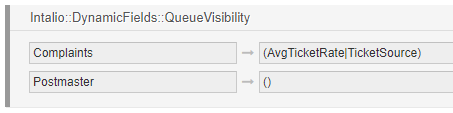
With the **Intalio::DynamicFields::QueueVisibility** option you can define which Dynamic Fields are visible within specific Queue.
In the example configuration above, OTRS has Dynamic Fields visibility restrictions enabled for two Queues: *Complaints* and *Postmaster*.
- *Complaints*: show only AvgTicketRate and TicketSource Dynamic Fields.
- *Postmaster*: no Dynamic Field is visible.
Dynamic Fields visibility restrictions for Queues has effect only when Queue is present on the list above. Otherwise all Dynamic Fields are shown.
##### Ticket Type
[](https://docs.intalioservices.com/uploads/images/gallery/2020-09/7VtGirVk31Bdrkd8-image-1599652722047.png)
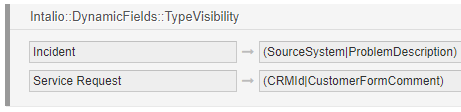
With the **Intalio::DynamicFields::TypeVisibility** option you can define which Dynamic Fields are visible for Tickets with specific Type.
In the example configuration above, OTRS has Dynamic Fields visibility restrictions enabled for two Ticket Types: *Incident* and *Service Request*.
- *Incident*: show only SourceSystem and ProblemDescription Dynamic Fields.
- *Service Request*: show only CRMId and CustomerFormComment Dynamic Fields.
Dynamic Fields visibility restrictions for Types has effect only when Type is present on the list above. Otherwise all Dynamic Fields are shown.